
09b: Domains, URLs, PIDs and custom website templates
Integrating a website or individual pages
with your existing domain
Heurist can generate a complete self-contained website - typically consisting of a header, footer, menu and web pages embedded in this structure - or it can create individual web pages which can be displayed as standalone pages or embedded in another webiste. How do you make these part of your existing domain and/or website?
The website and/or individual web pages will normally include content (including data and images) and functionality (including searches, reports and visualisations) dependant on Heurist's database engine, and must therefpre be generated by an instance of Heurist - they cannot live independently on a web server as they are generally far more than simply static html. The server can be one of the public services (eg. heuristref.net or Heurist.Huma-Num.fr) or your own private Heurist server.
The database you wish to publish must be on the corresponding server - for security and sustainability reasons, each instance of Heurist only has access to databases on its own server (or stack of servers).
Simplified/clean URLs
The standard Heurist URLs use parameters at the end such as ?db=my_database&tpl=xyz. These are not particularly 'friendly' for web indexing and interoperability. They can therefore be replaced on the servers managed by the Heurist team (HeuristRef.net and Heurist.Huma-Num.fr) as shown below. The system adminstrators on other servers can configure their servers appropriately to use these URLs (se later).
web - website Hml - xml output View - record view Tpl - smarty output
- direct access to a web site → https://heuristref.net/Rebekah_ARBookReviews/web/
- Show an individual record with a smarty template (.tpl file): → https://heurist.huma-num.fr/judaism_and_rome/tpl/public-record/75
- Show a query using a smarty template (.tpl file): → https://heurist.huma-num.fr/judaism_and_rome/tpl/public-record/q/t:10
- Show an individual record in html recordview: → https://heurist.huma-num.fr/judaism_and_rome/view/75
- Show an individual record in XML: → https://heurist.huma-num.fr/judaism_and_rome/rec-hml/75/d2
Generate XML in hml format for a given query: https://heurist.huma-num.fr/judaism_and_rome/hml/t:5
Add /d2, /d3 etc. if needed: default to …/d1 = depth 1 if the depth parameter is omitted
For tpl and hml besides record id, it is possible to specify comma separated list of ids or heurist query (without the q=)
For server administrators
The URLs above use Apache rewrite rules. See the program code under Server scripts for the full set of rewrites.
RewriteRule ^/([A-Za-z0-9_]+)/(web|tpl|hml|view)/(.*)$ /h7-alpha/redirects/resolver.php
RewriteRule ^/h6-alpha/([A-Za-z0-9_]+)/(web|tpl|hml|view)/(.*)$ /h7-alpha/redirects/resolver.php
- If the DBName is followed by number(s) directly (no alphabetic keyword), "web" is assumed or inserted:
heurist.huma-num.fr/IDENK/3/37471 should be equiv. of heurist.huma-num.fr/IDENK/web/3/37471
https://heuristau.net/h7-alpha/ART/web/147 = https://heuristau.net/h7-alpha/ART/147
If the DBname is followed by a word listed in the URLSubstitutions.txt file (see below) replace the words with the corresponding numbers and process the result:
Examples:
Contacts 157/150
Tentang 174/175?lang=fre
MED/{d+} /tpl/TEST1/[{"t":"5"},{"f:203":"{1}"},{"sortby":"t"}]
IND/{d+} /tpl/TEST1/{1}
test2/{d+} ?w=a&template=test2.tpl&mode=html&q=[{"t":"5"},{"f:203":"{1}"}]
As a keys we can use patterns with simplified tokens:
"{d+}" or "{\d+}" => "([0-9]+)" One or more digits
"{d*}" or "{\d*}" => "([0-9]*)" Zero or more digits
"{w+}" or "{\w+}" => "([A-Za-z0-9_]+)" One or more word characters
"{s+}" or "{segment}" => "([^/]+)" One URL/path segment
"{any}" => "(.+)" One or more of any character
Or standard regex
~^orders/([0-9]+)$~u
Examples:
"orders/{d+}" => "~^orders/([0-9]+)$~u"
"users/{w+}" => "~^users/([A-Za-z0-9_]+)$~u"
"pages/{segment}" => "~^pages/([^/]+)$~u"
"files/{any}" => "~^files/(.+)$~u"
"~^orders/([0-9]+)$~u" is returned unchanged.
In values use {nnn} to replace regex matching values
Here is a typical example of the substitutions file allowing the use of textual URLs for the user in place of the numeric URLs which the system recognises:

Self-contained website
Whatever the server which serves the database and website, you can make this appear as part of your domain. You can use an existing domain or purchase one quite cheaply if you don't already have one (typically $10 - 40 per year for .net and .org domains, but depends on the 'desirability' of the name - do a search for Cheap domains and shop around). Then ask the domain to point to your database.
There are two ways of pointing to the database; with or without masking.
With masking you will not see the URL change as you navigate within the website. These are good examples: http://digitalharlem.org/ and https://c18librariesonline.org/?db=Libraries_Readers_Culture_18C_Atlantic&website. The disadvantages are that you can't bookmark or address a specific page in the website or easily obtain page use statistics.
Without masking the domain will get you to the website, but then you will see the full Heurist URL. There are some advantages in this, notably that you can bookmark or point people directly to the URL of a specific page in the website and monitor its use, rather always getting the home page. The developers of website often think it is important to show simplified domain-specific URLs, but we think that concern is probably overdone, once users arrive on a website they are mostly looking at the page, not the URL.
Existing website
If you already have a website with a domain, there are a number of options for integrating Heurist web pages.
First, migrate your existing website to Heurist. In the long term this can save you a lot of trouble and probably money, as well as increase the chances of longer-term sustainability, because you don't have to maintain a separate web service or keep upgrading the website as the underlying CMS changes (since 2020 we have worked on migrating a number of CMS websites for researchers who do not have the technical support or can see the ongoing cost of migration). Heurist can, with a bit of work, reproduce most websites, although you may need to stick with your existing CMS if you have developed a complex and graphically rich site with specialised interactions, or use a lot of special functions such as ecommerce components.
Secondly, set up a link, or one of the menu items in your existing website, to switch the user over to your Heurist website, or to a single page, in order to display interactive searches and visualisations from the database. Within the Heurist website or page, provide a link to switch back to your existing website (which presumably contains higher level description of the project, and perhaps other databases). This can be made fairly seamless eg. by reproducing a narrow header bar (to maximise real estate) in the style of the main website and putting a Home icon or Back to website link in that header bar. You can also make several menu links to separate standalone Heurist web pages, each of which will navigate back to a specific location. You could also generate these as popups. If you use a domain with masking you can also just use a Back instruction to go back to the point you came from in the main website. You could also reproduce the menu structure of the main website and have the menu entries jump back to the appropriate place in the main website.
The third method - not our preference - is to create one or more standalone Heurist web pages and embed them directly in the existing website using iframes. The problem lies in maximising the space available for the interactive Heurist page and avoiding double scrollbars. It can be done, but will require an understanding of divs, CSS and Javascript if you don't want it popping up in a too-small fixed size box.
Assistance
We (the Heurist development team / Heurist Network) are generally happy to help set up websites, but as this tends to be project-specific rather than general development of benefit to the whole community, we can only really afford to do this, beyond simple advice, for projects which help sponsor Heurist development.
Custom default website layouts
Custom website layouts
Heurist defines a default style for websites it generates, which can be overriden to some degree with stylesheets within each website. However the owner of a Heurist server may want to define standard headers, footers and styles for websites run on their server to conform, for example, to corporate branding.
A server can be set up with one or more custom website layouts which determine the layout of the header and footer section of the website, and potentially of behaviours and styling within the content.
One layout may (optionally) be selected as the default which is used every time a new site is created, but the creator of the website can also specify a different layout among those defined.
Website layout is controlled by files in hclient/widgets/cms. This contains a default template cmsTemplate.php which contains instructions on how to develop further templates.
Default layout
To set the default layout of new websites created on the server, place this file or an edited version of this file in the parent directory of the Heurist codebase, normally /var/www/html/HEURIST.
The location of the template files can also be set in heuristConfig.php, defined by $default_CMS_Template_Path
Selecting a custom layout
If there are additional template files available, you can apply one of them to an individual website by setting the name in the Website template field of the CMS Homepage record (accessed through Publish > Website header / layout)

The template name can be specified without a path, in which case Heurist looks for it in the parent directory of the Heurist codebase (normally /var/www/html/HEURIST) or the directory specified by $default_CMS_Template_Path, or it can be specified with a path relative to the codebase as shown above.
The template file is a .php file but the extension can be ommitted.
Creating a template
To create a Heurist CMS template, first look at the example in hclient/widgets/cms/templates/cmsTemplate.php
This is the standard template for Heurist websites, as used in this help system. It can be modified by addition and replacement to create the template you require.
The template requires certain elements:
1. a php include in the <head> section: include $websiteScriptAndStyles_php;
2. Definition of html elements with the following ids: main-title, main-logo, main-logo-alt.
The content of these elements can be replaced with values defined in the CMS Homepage record.
3. Definition of an html element with id: main-content. It will be populated with content based on the menu item selected.
4. For Heurist widget menu
<div id="main-menu" class="mceNonEditable header-element" style="position:absolute;
top:110px;width:100%;min-height:40px;border:2px none yellow;color:black;font-size:1.1em;"
data-heurist-app-id="heurist_Navigation" data-generated="1">
<?php print $page_header_menu; ?>
</div>
5. Optional: if using bootstrap as part eg. of a corporate website style, you may need to add the following for the bootstrap menu:
3) Upload files for records to the different than HEURIST_FILESTORE folder.
To define other that HEURIST_FILESTORE folder, system admin has to define
$defaultRootFileUploadPath and $defaultRootFileUploadURL parameters in heuristConfigIni.php
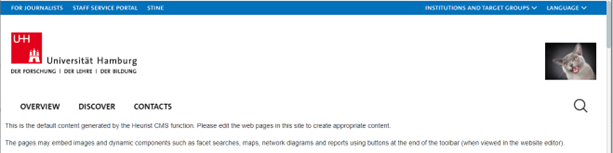
1) website template that uses UHH code of style (using insert.js)
There is cmsTemplate_HamburgUniversity.php. It uses https://www.uni-hamburg.de/onTEAM/inc/dom/v43/insert.js
User has to define the name of this template in “Custom website template file” field of main menu record.
No comments to display
No comments to display