
Ch 11: Basic server management
This chapter outlines some useful procedures for managing Heurist servers, including the servers managed by the Heurist development team / Heurist Network.
General observations
Heurist is designed to run on any Linux server
Emergency Unix commands
These commands may depend on the Unix version and the way MySQL is configured, refer to system documentation or ask AI for instructions if these do not work
- To restart MySQL (commonest form of failure eg. if disk space exhausted or stuck query). Works on HeuristRef.Net (OVH Cloud), HeuristAU.net (Intersect server) and Heurist.Huma-Num.fr
sudo service mysqld restart
Note: Sometimes restart does nothing (no response). In that case first use stop, then use start - To restart Apache web server
sudo apachectl restart
Handy Unix commands & other useful things
- Find Unix version: cat /etc/os-release
- Disk usage of subdirectories, largest first :
sudo du -sh /var/log/*/ | sort -hr - Delete files older than 30 days :
/usr/bin/find /var/log -maxdepth 1 -type f -name '*.gz' -mtime +30 -delete
(maxdepth 1 will go down one level into immediate subdirectory) - The MySQL password (for the root and/or heurist user) is set in the user table of the mysql database,
and configured in the /var/www/html/HEURIST/heuristConfigIni.php file for all instances, which may be overridden for a specific instance by /var/www/html/HEURIST/hx-xxxxxx/configIni.php.
Protocol for full update of Heurist servers
On HeuristRef.net (Heurit development team)
These are commands to be run from the unix interface accessed through SSH
Update the version number as required in the hx-alpha code on the reference server (HeuristRef.net)
and commit to the gitHub repository
cd /var/www/html/HEURIST
cd h7-alpha Change to the current development version (or beta)
sudo nano configIni.php Update the version number (also update on gitHub)
sudo ./copy_distribution_files.sh h7-alpha Update the development version distribution tarfile
sudo ./copy_distribution_files.sh h7-test Update the test version distribution tarfile
cd .. Change back to HEURIST directory
sudo ./copy_h7-alpha-to-heurist.sh Update the ' production' version from h7-alpha
cd heurist Change to the ' production' /heurist/ directory
sudo ./copy_distribution_files.sh heurist Update the production version distribution tarfile
Contents of /var/www/html/HEURIST/DISTRIBUTION :
-rw-rwxr--. 1 apache heurist 15980782 Jun 5 06:57 heurist.tar.bz2
-rw-rwxr--. 1 apache heurist 2506 Jun 5 06:57 verifyInstallation.zip
-rw-rwxr--. 1 apache heurist 6472 Jun 5 06:57 copy_distribution_files.sh
-rw-rwxr--. 1 apache heurist 15947835 Jun 5 06:55 h7-alpha.tar.bz2
-rw-rwxr--. 1 apache heurist 15954804 Jun 5 06:05 h7-test.tar.bz2
-rw-rwxr--. 1 apache heurist 9324732 Jun 5 00:45 h8-alpha.tar.bz2
-rwxrwxr--. 1 apache heurist 6333 Jan 16 09:44 update_heurist.sh
drwxrwxr-x. 2 apache heurist 75 Nov 25 2025 HEURIST_SUPPORT
On other Heurist servers
This protocol is that used on the servers managed by the Heurist development team as of 2026 (Heurist.Huma-Num.fr, HeuristAU.Net and Greek NHRF server)
The same principles can be applied on any server, but this should be automated (at least for h7-alpha)
through a cron setting (typically edited with sudo crontab -e)
# Update heurist alpha version from reference server - build runs daily at 00:30
# Note: 'dummy' parameter replaces sudo param as some servers eg. Huma-Num do not accept sudo without a tty
# This does not update the support libraries, need to run manually without "codeonly" to do this
30 00 * * * curl -l https://heuristref.net/HEURIST/DISTRIBUTION/update_heurist.sh | bash -s h7-alpha dummy codeonly >> /var/www/html/HEURIST/h7-alpha_install.log 2>&1
# precautionary fix of group ownership and permissions
00 01 * * * chown -R apache:heurist /var/www/html/HEURIST
00 01 * * * chmod -R g+rwx /var/www/html/HEURIST
00 01 * * * chown -R apache:heurist /data/HEURIST_FILESTORE
00 01 * * * chmod -R g+rwx /data/HEURIST_FILESTORE
Omitting codeonly at the end causes the support files to be updated - this is generally unnecessary and is only needed once, as all versions share the same support files (we make sure that is always the case, even if there are copies of different versions of the same library)
Update the test version including the support files
curl -l https://HeuristRef.net/HEURIST/DISTRIBUTION/update_heurist.sh | bash -s h7-test sudo
Update the code only for h7-alpha:
curl -l https://HeuristRef.net/HEURIST/DISTRIBUTION/update_heurist.sh | bash -s h7-alpha sudo codeonly
Copy h7-alpha to heurist:|
cd /var/www/html/HEURIST
sudo ./copy_h7-alpha-to-heurist.sh
or alternatively:
cd /var/www/html/HEURIST
chown -R apache heurist
chgrp -R heurist heurist
rm -Rf heurist-temp
cp -R h7-alpha heurist-temp
rm -Rf heurist-prev
mv heurist heurist-prev
mv heurist-temp heurist
chown -R apache heurist
chgrp -R heurist heurist
rm -Rf heurist-temp
Remember to update the version number in configIni.php
and commit to gitHub with a title suh as "Version 7.?.? distribution"
Server Manager functions
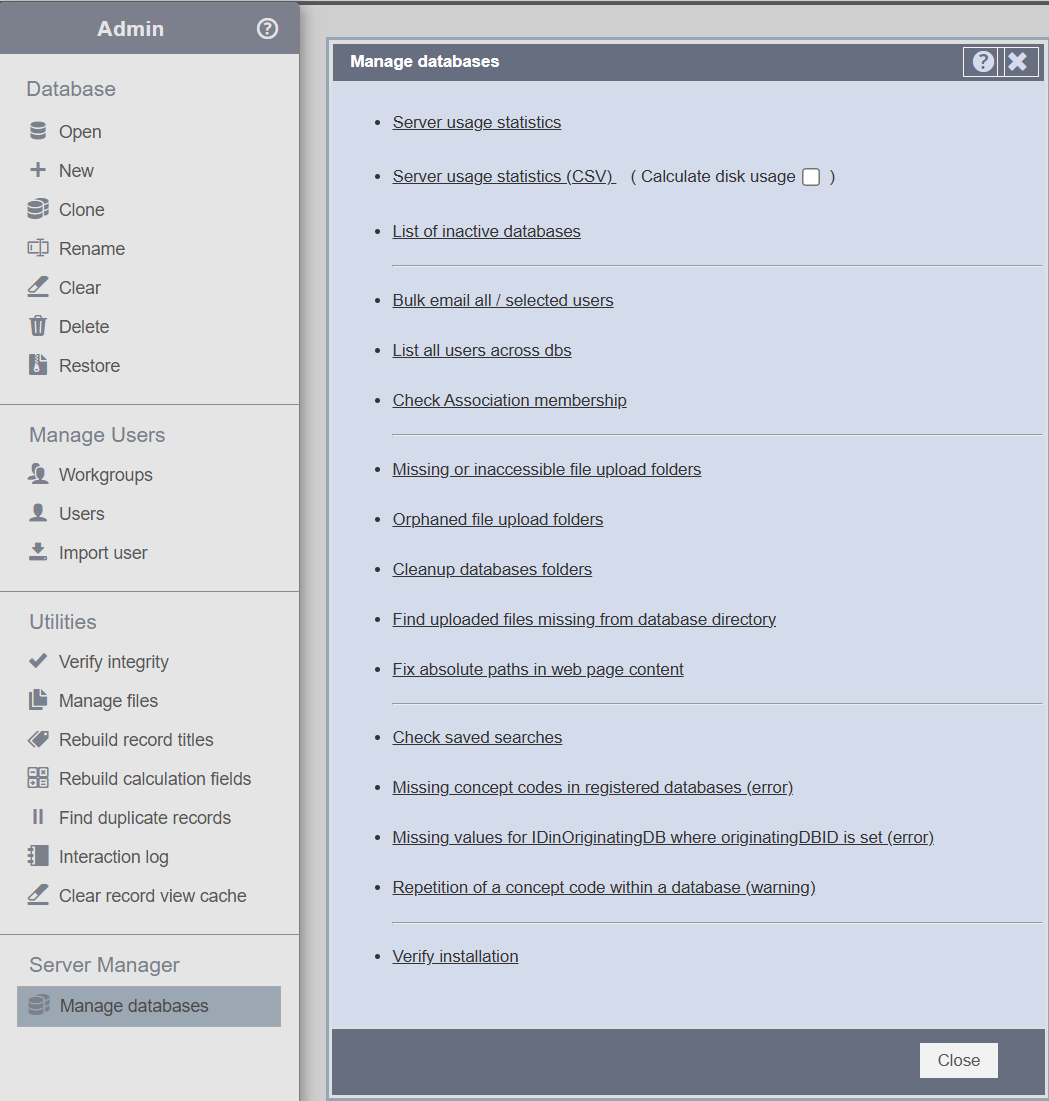
Heurist's web interface includes a restricted menu (Admin > Server Manager) which is accessed through a special password set in the heuristConfigIni.php file. This allows the managers of a particular instance to carry out operations across all the databases on the server, including some general integrity checks and maintenance operations, obtaining lists of users and the databases they are attached to, statistics about usage and disk space, bulk mailing users etc.
Since this is only available to the server managers, and since the functions are relatively self obvious and include some explanation when selected, we will not bother with further documentation.
Log files and performance
There are often numerous timestamped tables such as:
import20260709033509.ibd
import20260710034725.ibd
import20260711005435.ibd
These are import-working tables and may collectively consume substantial space across thousands of databases (in practice on Huma-Num in July 2026 they only consume a few hundred MBytes). Investigate them with:
SELECT TABLE_SCHEMA, TABLE_NAME,
       ROUND((DATA_LENGTH + INDEX_LENGTH) / 1024 / 1024, 1) AS size_mb
FROM information_schema.TABLES
WHERE TABLE_NAME REGEXP '^import[0-9]{14}$'
ORDER BY DATA_LENGTH + INDEX_LENGTH DESC;
They should only be dropped after confirming that Heurist no longer needs them.
To see the largest tables across the server :
Note: on the Huma-Num server this times out. It's probably a good idea to focus on rec_Details which is generally the largest table i nteh database. Records could also be large.
SELECT TABLE_SCHEMA, TABLE_NAME,
       ENGINE,
       ROUND(DATA_LENGTH / 1024 / 1024, 1) AS data_mb,
       ROUND(INDEX_LENGTH / 1024 / 1024, 1) AS index_mb,
       ROUND(DATA_FREE / 1024 / 1024, 1) AS free_mb
FROM information_schema.TABLES
ORDER BY DATA_LENGTH + INDEX_LENGTH DESC
LIMIT 50;
Performance
Nothing in the filenames suggests an obvious InnoDB performance fault. The useful checks are:
SELECT VERSION();

SHOW VARIABLES WHERE Variable_name IN
('innodb_buffer_pool_size',
 'innodb_file_per_table',
 'slow_query_log',
 'long_query_time',
 'innodb_temp_data_file_path');

SHOW GLOBAL STATUS WHERE Variable_name IN
('Innodb_buffer_pool_reads',
 'Innodb_buffer_pool_read_requests',
 'Created_tmp_disk_tables',
 'Created_tmp_tables');
The main performance consideration will usually be whether innodb_buffer_pool_size is suitably matched to the server’s RAM and workload—not reducing ibdata1. The slow-query log is valuable here: analyse it before discarding the old contents, because it can identify the queries and indexes responsible for poor performance.
Log rotation
Immediate cleanup: rotate the slow-query log
First check whether it is already managed:
sudo grep -R "slow.log\|slow_query" /etc/logrotate.d /etc/logrotate.confIf not, create /etc/logrotate.d/mysql-slow containing:
/var/lib/mysql/*-slow.log {
    weekly
    rotate 12
    size 100M
    compress
    delaycompress
    missingok
    notifempty
    create 640 mysql mysql
    sharedscripts
    postrotate
        /usr/bin/mysqladmin flush-logs >/dev/null 2>&1 || true
    endscript
}
Do not simply delete the active slow log: MySQL may retain the open file handle, meaning the disk space is not actually released until the log is reopened.
Test the configuration with:
sudo logrotate -d /etc/logrotate.d/mysql-slow
No comments to display
No comments to display