
Ch 07a : Recoding and verification
Introduction
In this chapter we will look at ways that data in the database can be verified for consistency and modified through batch processes.
Admin > Verify Integrity
Content generated by ChatGPT Sol Lite 6/10/26 based on application source code.
Admin > Verify Integrity checks the consistency of a Heurist database’s definitions, records and supporting indexes. It detects problems such as broken record pointers, invalid terms, missing required values and inconsistent field definitions, and provides repair options where a correction can be made automatically.
Select the desired checks and click Verify Integrity. Ordinary checks are selected initially; checks labelled Slow must be selected separately. “Mark all” applies to the ordinary checks. On large databases, running slow checks individually can help avoid timeouts.
Follow the record links in the report to inspect affected data. Prioritise invalid owners, nonexistent pointer targets and nonexistent term values, then problems affecting the searches, maps, timelines or workflows your project uses.
Verification is not entirely read-only: some checks perform housekeeping or corrections during the check itself, including definition-group repair, workflow-stage consolidation and certain whitespace corrections. Date checking can also normalise some recognised formats. Take a safeguard backup before a comprehensive run, and read repair buttons carefully—especially those offering to delete faulty values.
A successful check establishes consistency for the conditions tested. It does not prove that the research content is accurate, that a valid pointer identifies the intended record, or that every attachment and external resource is recoverable.
Not all reported problems are equally serious. Some prevent information from being accessed or interpreted correctly; others indicate incomplete data, or simply untidy formatting. A database with warnings is not necessarily unusable.
The descriptions below follow the current version 7 code. The priority ratings describe the practical consequences of leaving a problem unresolved; they are not severity labels displayed by Heurist.
Record ownership and connections
| Check | What is checked | Consequences if left unresolved |
|---|---|---|
Record Owner/Creator | Checks that the owner and “Added by” references identify an existing user or group. | Essential for invalid owners: ownership controls editing permissions, and an invalid owner can make normal management of records difficult. An invalid creator mainly damages attribution. The repair assigns invalid references to Database Manager, ID 2. |
Pointer Targets | Finds record pointers referring to records that do not exist. | Essential: these links cannot be followed, and connected searches, reports and relationship displays may be incomplete. The automatic repair deletes the faulty pointers; it cannot recover the intended target. |
Target Types | Checks that a pointer’s target belongs to one of the record types permitted for that field. | Important: a link may open successfully but connect the wrong kind of information—for example, an Author field pointing to a Place. Searches and reports that assume the expected type can give misleading results. |
Invalid Parents | Checks that parent–child connections agree in both directions: the parent identifies the child, and the child identifies the parent. | Important where parent–child structures are used: records may be omitted from child lists or appear inconsistently in navigation and editing. Some missing reverse pointers can be added automatically; other discrepancies require inspection. |
Vocabularies and database definitions
| Check | What is checked | Consequences if left unresolved |
|---|---|---|
Invalid/Duplicate Terms | Finds references to missing parent or inverse terms, and flags duplicate labels or labels ending in numbers that may have resulted from duplicate avoidance. | Important for broken term references: vocabulary hierarchy or inverse relationships may behave incorrectly. Usually lower priority for duplicate labels: these can split classification and search results, but identical labels in different contexts may be legitimate. Review before merging or removing terms. |
Field Types | Checks field definitions for references to nonexistent terms, nonexistent non-selectable terms, or nonexistent record types in pointer constraints. | Usually a routine repair: stale references can affect available choices or constraints. Heurist offers Auto Repair. Repeated recurrence deserves investigation. |
Default Values | Checks that defaults specified in record type definitions are valid for their fields. | Important for subsequent data entry: new records may receive an invalid default or fail to receive the intended value. Existing records are not necessarily affected. |
Definitions Groups | Checks that record types, base fields and vocabularies belong to existing organisational groups. | Mostly a definition-management problem: definitions may be difficult to find in the design interface. The checker automatically places affected definitions in the appropriate Trash group when that group exists; this does not delete them. |
Title Masks | Checks whether each record type has a valid expression for constructing record titles. | Important for usability: generated titles may fail or be incomplete, making records difficult to identify in results and pointer selectors. The underlying field values are not necessarily damaged. |
Term Values | Finds term fields containing identifiers for terms that do not exist. | Essential for affected classifications: the value cannot be resolved to a valid term, compromising display and searching. The automatic repair deletes the faulty term values; it does not reconstruct their meaning. |
Expected Terms | Checks that existing terms belong to the vocabulary or permitted term selection specified for the field. | Important: a recognisable term can still be inappropriate for its field, causing inconsistent classification and filtering. Where the permitted vocabulary contains the same label, Heurist can offer a replacement. |
Record contents
| Check | What is checked | Consequences if left unresolved |
|---|---|---|
Empty Fields | Finds stored field entries containing null or empty values. | Generally minor housekeeping: an empty entry adds no useful information and can complicate value counts or processing. Removing it does not supply any missing information. |
Non-Standard Fields | Finds values in fields that are not included in the record type’s defined field list. | Often harmless and sometimes intentional, particularly after imports or structural changes. The values remain stored, but may be overlooked during normal editing or reporting. Consider adding the field to the record type rather than deleting its data. |
Required Fields | Finds required fields that are missing or empty. | Depends on the field: omission of an essential identifier or descriptive value may compromise the record; another required field may merely represent a completeness policy. The database can still operate, but the records do not meet their declared requirements. |
Single Value Fields | Finds fields defined to accept one value that contain multiple values. | Important when the values conflict: different displays or processing routines may use one value or show several. Review the values and either retain the correct one or change the field’s repeatability. |
Multiple Workflow Stages | Finds multiple workflow-stage values where the field permits only one. | Usually moderate: contradictory stages make workflow filtering unreliable. The checker automatically reduces them to one stage, preferring a non-importing stage where available. |
Geo Values | Checks for missing or invalid geometry, inconsistent geometry descriptions, and coordinates outside valid bounds. | Important for mapping and spatial analysis: affected records may be absent from maps or appear in incorrect locations. Certain wrapped longitudes can be corrected automatically; other problems need manual repair. |
Date Values | Checks whether date values can be recognised and interpreted, offering corrections for some formats and identifying values requiring manual attention. | Important for chronological work: invalid or misinterpreted dates can give incorrect date searches, sorting or timeline positions. Review ambiguous day/month interpretations carefully. |
Spaces in Values | Checks text for leading and trailing whitespace, double spaces and longer sequences of whitespace. | Usually very minor: mainly affects presentation, although whitespace can interfere with matching or duplicate detection. Some whitespace is corrected automatically; longer sequences are offered for selected repair. Preserve intentional formatting in transcriptions or quotations. |
Invalid Characters | Checks free-text and block-text values for characters regarded as invalid by the checker. | Variable importance: these can cause display or export problems. Inspect the reported characters before changing them, particularly in multilingual text or source transcriptions. |
Supporting indexes
| Check | What is checked | Consequences if left unresolved |
|---|---|---|
Date Index | Checks consistency between stored date fields and the supporting date index. | Important for reliable date searches: records may be missed or incorrectly selected even when their displayed dates look correct. Rebuilding the index repairs the supporting search data; invalid source dates require separate correction. |
Relationship Cache | Checks the supporting cache used to represent record relationships. | Important for connected searches and relationship displays: links may be missing or inconsistent despite the underlying records being correct. The cache can be rebuilt from the stored data. |
Two additional checks open separately:
| Check | Purpose and consequences |
|---|---|
Check files for consistency | Finds missing, duplicate and unused uploaded files. Missing originals are serious: attachments cannot be opened and must be recovered or relinked. Duplicate or unused files are generally storage housekeeping; inspect them before removal. |
Check URLs in text fields and titles | Checks record URLs and links within text fields. Broken links reduce access to referenced resources, but do not normally damage the database itself. A failed URL check can also reflect temporary unavailability or access restrictions. |
Recode menu
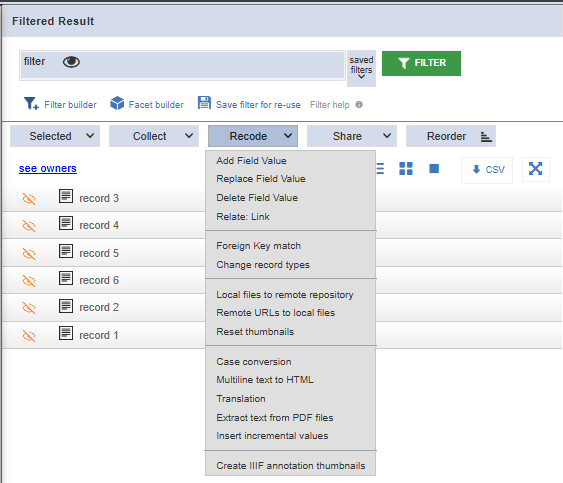
Add field value
Adds a value to a chosen field across the selected records, leaving existing values unchanged. For example, add the same keyword to a group of records. Records are skipped if adding the value would exceed the field’s permitted number of values.
Replace field value
Replaces matching values in a chosen field across the selected records. You can replace a complete value, replace matching text within a value, or replace all values in the field. Other fields are unaffected.
Delete field value
Removes matching values, matching text within values, or all values from a chosen field across the selected records. It does not delete the records themselves. Records are normally skipped if deletion would leave a required field empty.
Relate : Link
Links the selected records to a chosen target record, using a record pointer field or a typed relationship. For example, link a group of documents to the person who created them.
Foreign key match
Creates record links by matching values in a field of the source records with values in a field of the target records. For example, match an institution code in person records to the same code in institution records, then store the resulting links in a record pointer field. The source results must contain only one record type.
Change record types
Changes the selected records to another record type. Existing data is retained, but it may not satisfy the new type’s field requirements. Run Verify → Verify integrity afterwards to identify records needing correction.
Local files to remote repository
Uploads locally stored files referenced by a chosen field to a configured remote repository. Updates their file references to point to the repository resources. An option allows the local copies to be deleted after upload.
Remote URLs to local files
Downloads files referenced by remote URLs in a chosen file field and stores them in the database’s file storage. Replaces the remote references with references to the local copies. Other fields are unaffected.
Reset thumbnails
- Search for all records in the database.
- Choose Recode → Refresh thumbnails (may appear as Reset thumbnails).
- Select Current results set, then Go.
- Reopen Admin → Manage files to trigger thumbnail regeneration.
This removes the existing thumbnails—including broken ones—and recreates them when next displayed. Original images are untouched. It covers files linked to records; unreferenced files are excluded.
Case conversion
Changes the capitalisation of text in a chosen field across the selected records, using the selected conversion rule. A list of exceptions allows particular words or phrases to retain specified capitalisation.
Multiline text to HTML
Converts plain text in a multiline text field into HTML, preserving line breaks, paragraph breaks and repeated spaces when displayed. Values already containing HTML are left unchanged.
Translation
Translates text in a chosen field into the selected language using the configured DeepL service. Stores the translation as an additional value in the same field, identified by a language prefix, while retaining the source text. Options allow existing translations to be replaced or deleted.
Extract text from PDF files
Extracts embedded text from PDF files attached to the selected records and stores it in a chosen text field, normally Extracted text (Concept ID 2-652). Each PDF’s text is stored as a separate value, up to 64,000 characters, without overwriting populated destination values. This extracts existing PDF text; scanned pages require OCR first.
Insert incremental values
This function is designed to fill in or extend values which increment by 1. This can be applied to text fields as well as to numeric fields. It is typically used to create sequences of identifiers which are more appropriate to the users' needs than the simple sequential numbering of the Heurist identifiers (H-IDs), although the use of the latter are strongly recommended wherever possible as they are unique and an unequivocal identifier for every record (even across all registered databases provided they are prefixed with the database ID - see chapter ????).
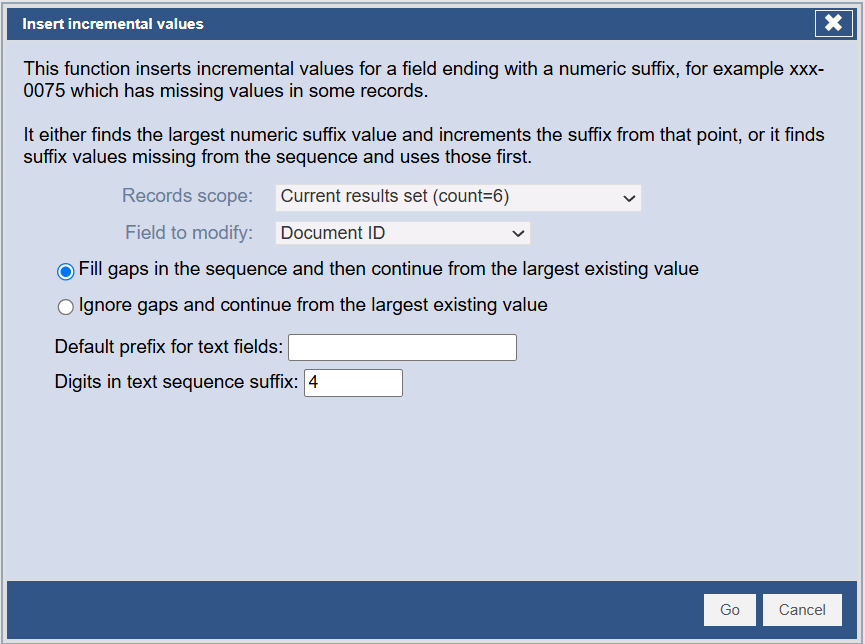
The function will automatically pick up an existing prefix in a text field, so if there are values abcd-1, abcd-2, ... it will generate values with a prefix abcd- followed by the next available number. If multiple prefixes are used you should specify the prefix you want, otherwise the prefix is unpredictable (generally the last one used).
By default this function left pads numbers with zeroes (default 4 digits), so you will get values such as abcd-0008 etc. but this can be changed with Digits in numeric suffix (text fields only)
Create IIIF annotation thumbnails
TODO
This does not in fact exist @ 6/10/2026. Check what was meant here,
No comments to display
No comments to display